Rythmo Triage

Your incident management in one place

An incident management and patient triage platform for event medical teams, ski patrols and rescue organisations. Crews and posts work from their phones and record each patient's triage category. Command sees every incident, team and handover in one place, in a browser or on a phone.

Ready for your next event. Talk to us about a live demo or a licence. Licensed to organisations, never sold to individuals.

Or email hello@rythmo.com.au.

What everyone sees

The commander's browser and the phones in the field, from a made-up event. The numbers show what each part does.

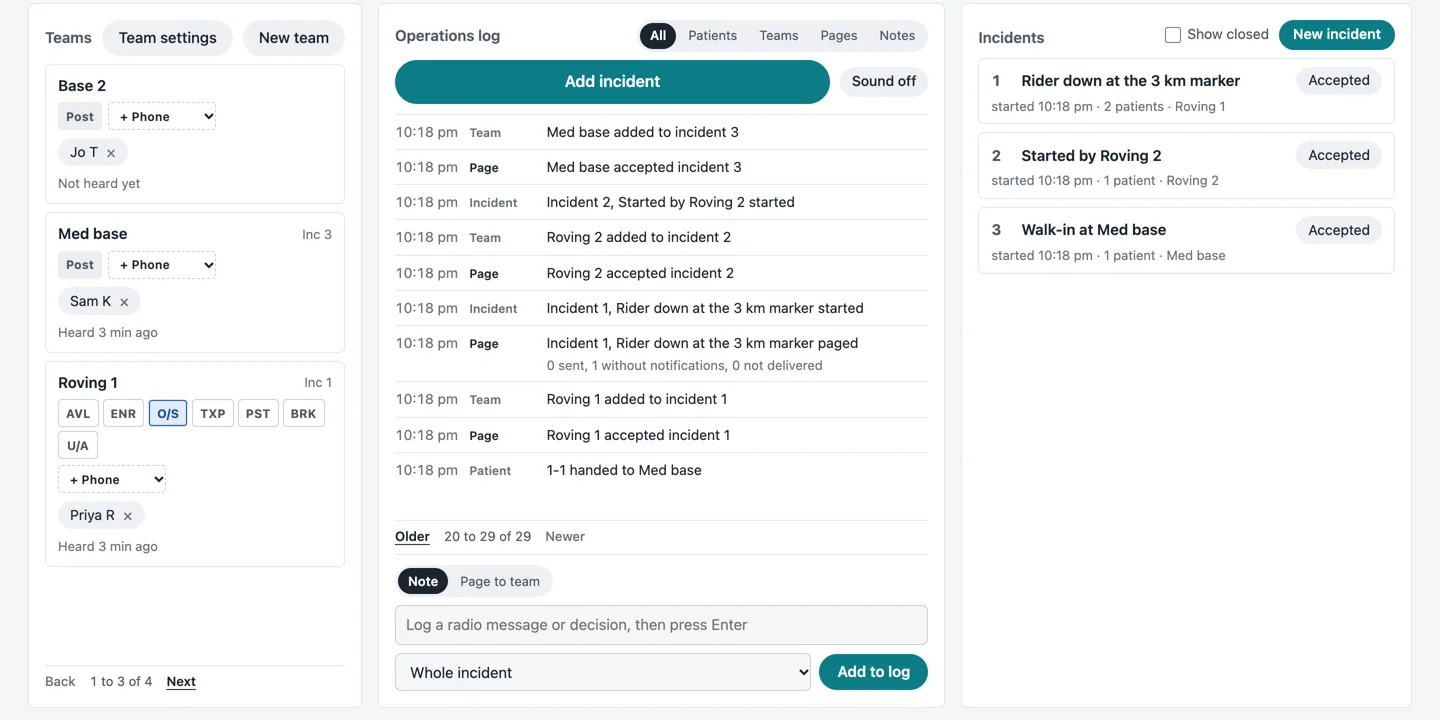
Screenshot of the commander view in a browser: teams with their status down the left, an Add incident button and the operations log in the middle with a box to add a note or page a team, and the incident list on the right

The commander view

  1. Every team down one side, with its status.
  2. Add an incident from a call.
  3. The operations log: every job, page, handover and note, with the time.
  4. Log a radio message or decision, or page a team in free text.
  5. Each incident, with its patients and the teams on it.
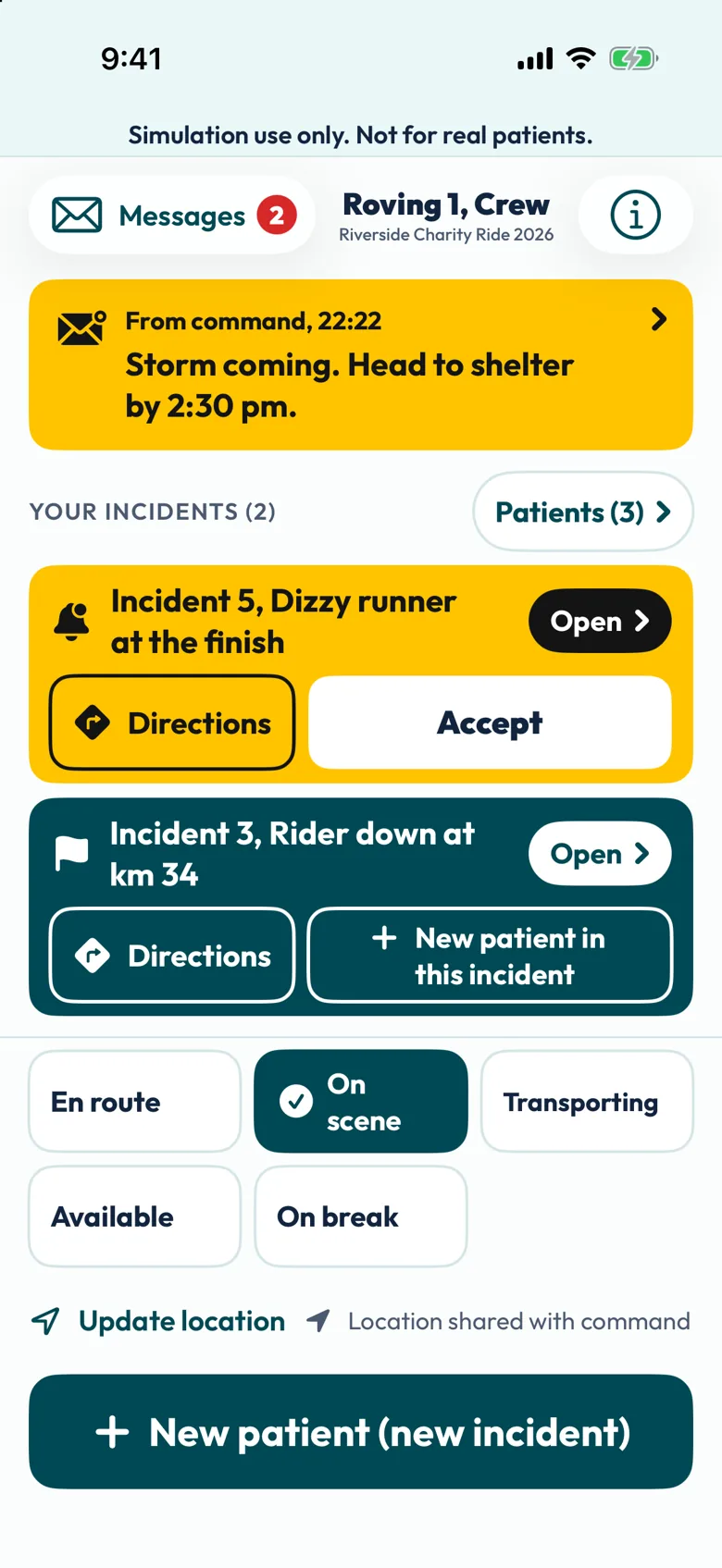
  1. A crew's phone

    Screenshot of a crew phone marked Simulation use only: a message from command, an incident with Directions and Accept, another with New patient in this incident, status buttons for En route, On scene, Transporting, Available and On break, and Location shared with command
    1. Pages from command arrive as alerts.
    2. A job arrives with Accept and directions.
    3. En route, On scene, Transporting or on a break, in one tap.
    4. Location shared with command while the app is open, if the event shares locations and the phone allows it.
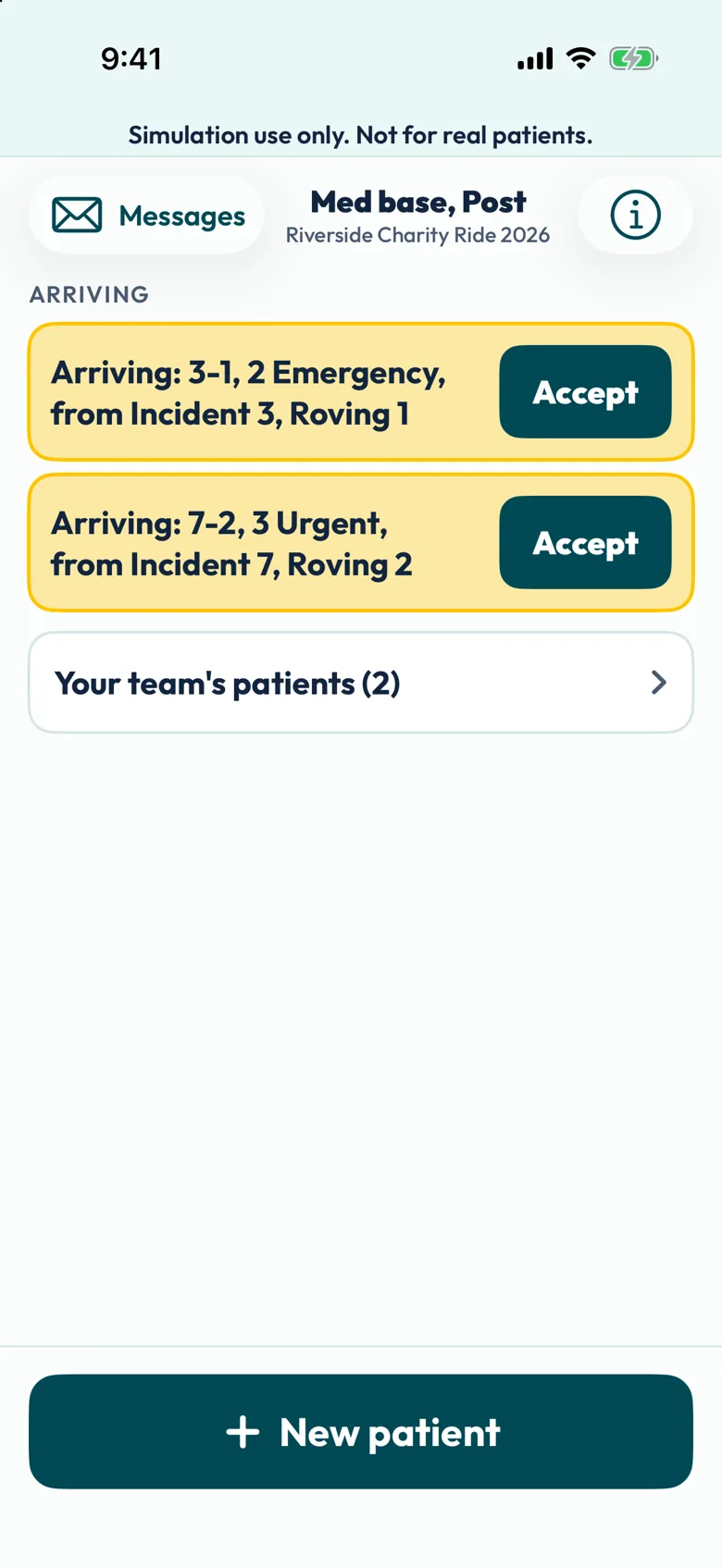
  2. A post's phone

    Screenshot of a post phone for Med base marked Simulation use only, with two patients arriving from incidents, each with an Accept button, and Your team's patients
    1. Handovers arriving at the post, to accept.
    2. The post's own patients, one tap away.
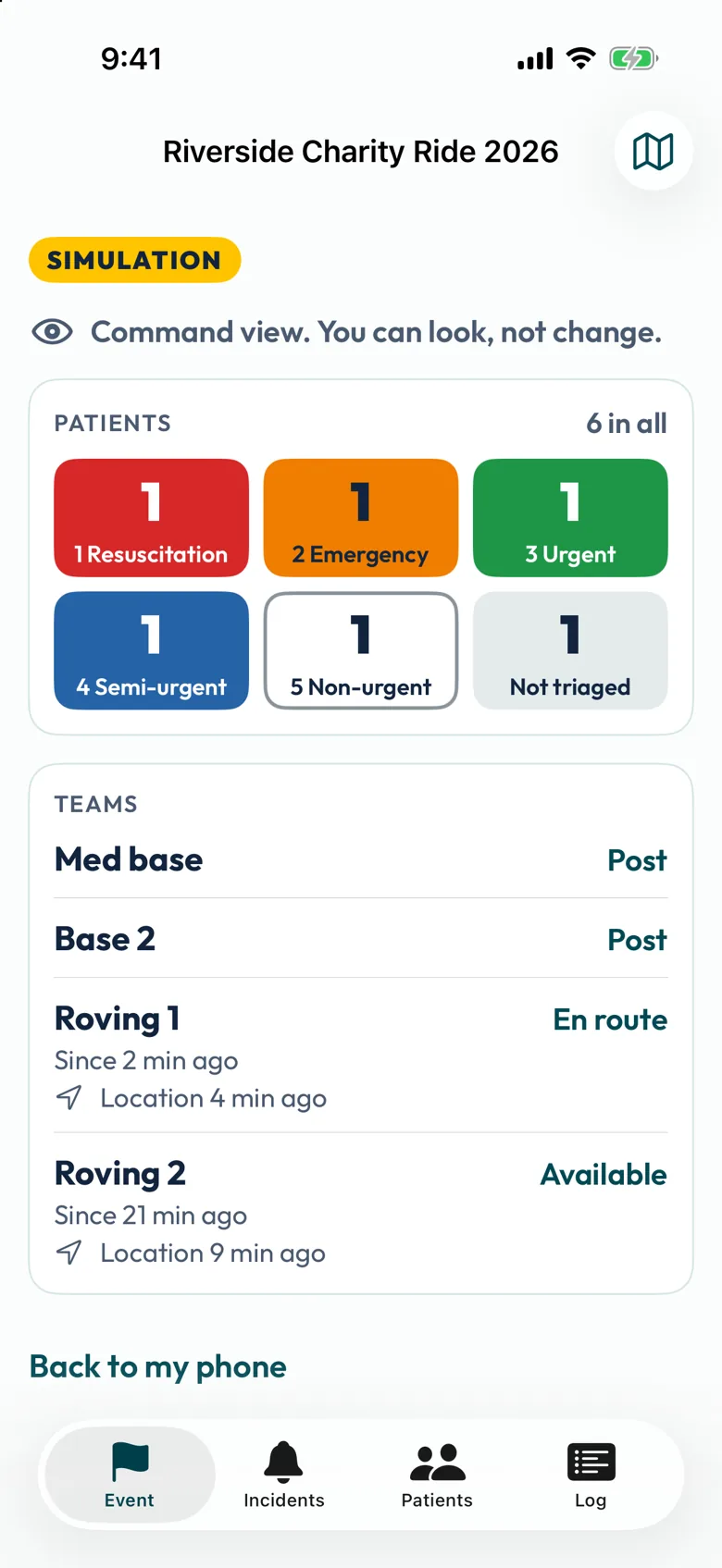
  3. Command on a phone

    Screenshot of the command view on a phone, badged Simulation, reading Command view, you can look, not change, with patients counted by category and each team's status and last location
    1. Marked Simulation. This view can look, not change.
    2. Patients by category, across the event.
    3. Every team, with its status and when its location last came in.

Screenshots from a test build, made-up event and patients.

Who it's for

Set up around how your team already works.

  • Major event medical teamsFestivals, sport, and mass participation rides and runs, with crews spread across a big site.
  • Ski patrols and rescue organisationsPatrollers on the mountain or teams on a search, a first aid post or base, and a patrol room that sees the whole picture.
  • Universities and training providersMass casualty exercises with mannequins, simulated patients and actors, and an after-action record for the debrief.

How an event runs

Set up your teams, hand out the event codes, and run the day. Everyone works from the same picture.

On the crews' phones

Crews and posts

  • Each phone joins the event as a crew or a post with an event code.
  • A job arrives with Accept, then On scene and Transporting. Crews can mark themselves on a break.
  • Hand a patient over to a post in a couple of taps.
  • Pages and handovers arrive as alerts, and each phone sets how loud they are.
  • Works alongside Rythmo Triage MCI, our mass casualty triage app, if your clinicians use it.

In the commander's browser

The commander view

  • Every team down one side, with its status, and an operations log with notes.
  • Add an incident from a call: the call questions record what the caller says and build a short brief. They don't set a priority.
  • Each incident opens in its own window, with the nearest teams and their distance.
  • A map with your landmarks, bases and site plan, plus distance and bearing between any two points.
  • Page any team in free text, follow every move in the movements log, and send a METHANE report.

Set up for your day

  • Nothing for the commander to installThe commander view runs in a web browser.
  • Start a new eventSet one up from the overview, with its own codes for the phones that join it.
  • The simulation bannerEvery screen is marked "Simulation use only". The commander can turn the banner off for an exercise that needs a realistic screen. The setup is still a simulation, and exports and reports still say so.
  • Run it from a phoneA commander can run the event from their own phone with the commander code, locked with Face ID, and dictate notes on the phone itself. Anyone else on the Commander team gets a Command view that can look, not change.
  • After the eventEnd the event and download an after-action record as a CSV for your debrief.
  • No names asked forPages and location notes remind you not to enter patient names. The patients are made up.

What it shares

Command needs a connection, because the phones and the commander view share the event through our commander server. It shares each crew's status, the calls, notes, pages and handovers, and the triage category recorded for each patient (and, on a sieve setup, the category the app suggested). While the app is open, each crew phone also shares its location when the app opens, every 2 minutes and when the crew taps a status. Triage itself still works with no signal.

The full detail is in our privacy policy.

What it doesn't do

  • It doesn't send crews for you. Every job and every page is a person's decision.
  • The call questions don't triage the caller's patient. They record what was said.
  • It doesn't replace your radio, your command structure or your major incident training.
  • No study of it has been done.

Simulation setup. In its simulation configuration, Rythmo Triage is a training and research tool for the licensed institution. It is used in simulated mass casualty exercises with mannequins, simulated patients and actors. It is not for use with real patients or for any decision about a real person's care.

THIS PRODUCT IS NOT AVAILABLE FOR PURCHASE BY THE GENERAL PUBLIC. ALWAYS FOLLOW THE DIRECTIONS FOR USE.

Questions

Does the commander need an app?

No. The commander view runs in a web browser. A commander can also run the event from the Rythmo Triage app on their phone.

Does it work without signal?

Triage does. Sharing with the commander view, paging and handovers need a connection.

Which phones does it run on?

iPhone, on iOS 17 or later. Android is planned.

How is it licensed?

Licensed to organisations, never sold to individuals. Tell us how your events run and we'll set it up around them. Contact us for a quote.

See it run

We'll run a short made-up event with you, with a few phones and the commander view.

Or email hello@rythmo.com.au.

Sources

METHANE: Advanced Life Support Group; Gleeson T, Mackway-Jones K, editors. Major incident medical management and support: the practical approach at the scene. 4th ed. Chichester: Wiley-Blackwell; 2023. Rythmo isn't affiliated with or endorsed by Advanced Life Support Group.