Rythmo Triage

Mass casualty triage, set up for your service

A phone app that steps your clinicians through the triage tool your service already uses, one question at a time. Every suggested priority comes with the path that produced it, and nothing counts until the clinician accepts it or changes it.

For ambulance services, event medical providers and universities. Licensed to your organisation and set up around your own protocol, never sold to individuals. Talk to us about a live demo, a simulation trial or a licence.

Or email hello@rythmo.com.au.

Screenshot of Rythmo Triage suggesting P1 Immediate on a large Accept P1 Immediate button, with the deciding step, RR 40 outside 10 to 29, under it
Screenshot from a test build

Two ways to use it

The same app, set up one of two ways: for real incidents, or for simulation with no real patients.

Operational use

For services and their clinicians

For ambulance services, event medical providers and other organisations whose registered health professionals triage at mass casualty incidents and major events.

  • Set up with your triage tool, your thresholds and your category labels.
  • Your clinical lead checks the setup against your protocol and signs it off before go-live.
  • Your responders activate it with your service's own code. You decide who gets it.
  • For registered health professionals trained in mass casualty triage, such as paramedics, nurses and doctors.
Ask for a live demo

Simulation and training

For universities and training providers

For institutions that run mass casualty exercises with mannequins, simulated patients and actors. No real patients, ever.

  • A separate simulation setup, marked "Simulation use only" on screen.
  • Your students and staff use it in your exercises, labs and teaching.
  • Not for placements, shifts or real incidents. The licence keeps it to simulation, training and research.
  • You control who gets the code, and the setup follows the tool you teach.
Talk to us about a training licence

See it with your triage tool

The app follows the published tool your service already uses, question by question, in its published order. Pick a tool to see how it looks.

MIMMS triage sieve

Walking, breathing, the airway, respiratory rate, then circulation. When the sieve needs a respiratory rate or pulse, the clinician taps once per breath or beat, types a number they counted, or records that it couldn't be obtained.

Questions
Walking? Breathing? Open the airway, breathing now? Respiratory rate. Pulse, or capillary refill.
Rates
Tapped, with a confidence label that firms up as the taps settle, or typed.
Categories
P1 Immediate, P2 Urgent, P3 Delayed and Dead by default, or your service's own words.
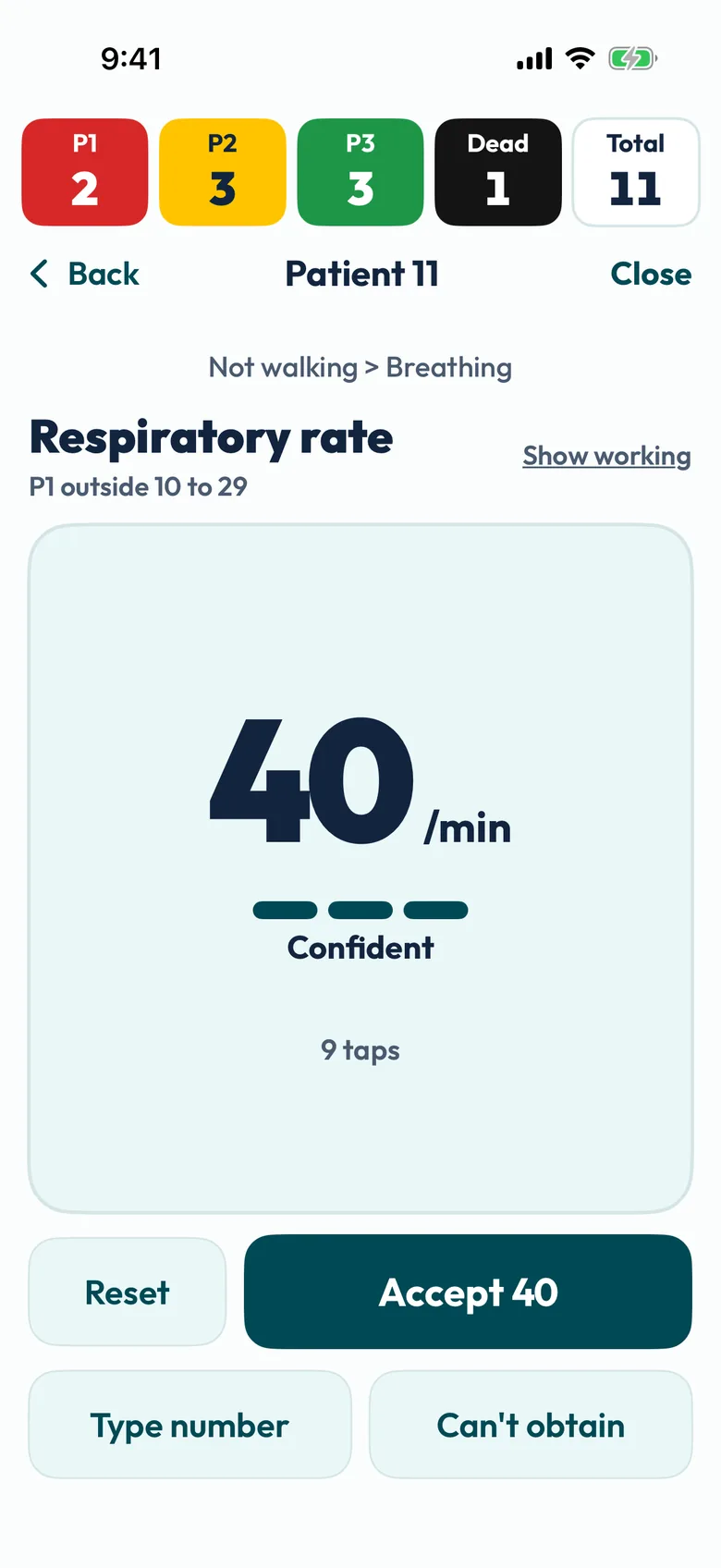
  • Screenshot of the respiratory rate step: 40 per minute, Confident, after 9 taps, with the threshold P1 outside 10 to 29 and buttons for Accept 40, Reset, Type number and Can't obtain
    Respiratory rate, tapped once per breath, with the threshold it will be checked against.
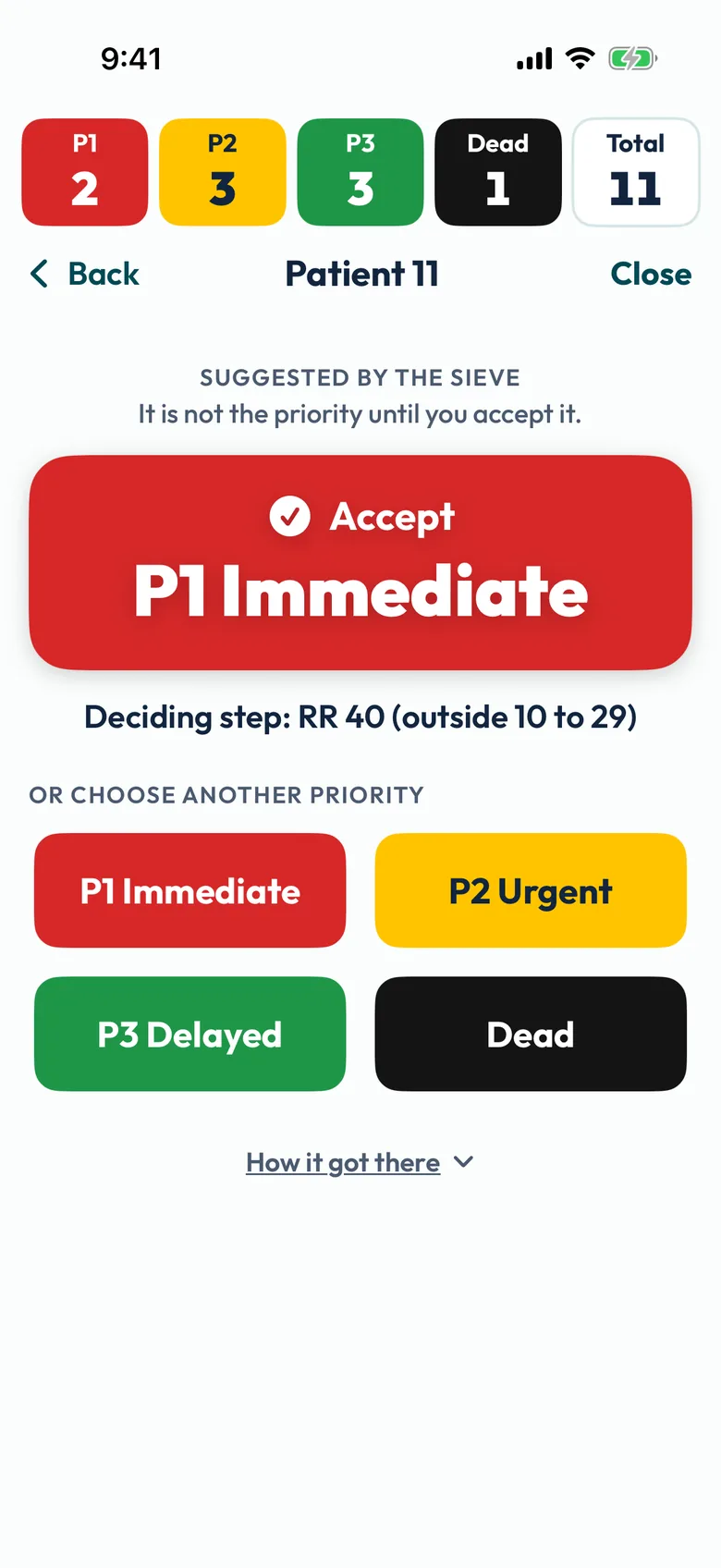
  • Screenshot of the suggestion screen: Suggested by the sieve, it is not the priority until you accept it, a large Accept P1 Immediate button, Deciding step RR 40 outside 10 to 29, the four priorities to choose instead, and How it got there
    The suggestion on one big Accept, with the step that decided it. The full path is one tap away, under How it got there. It isn't the priority until the clinician accepts it.
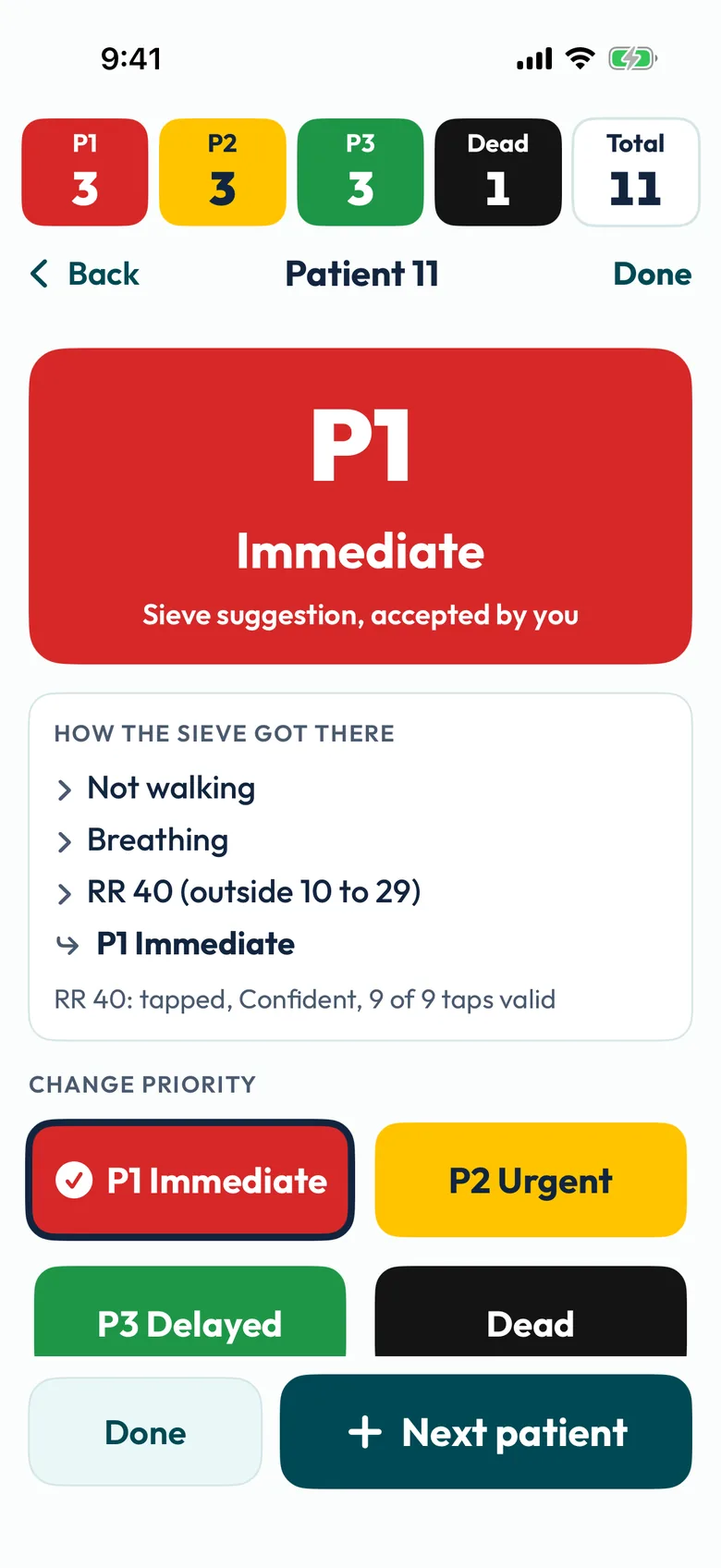
  • Screenshot of the accepted result: P1 Immediate, sieve suggestion, accepted by you, with the path, Change priority buttons and the tally at the top now showing 3 P1
    Accepted and counted in the tally at the top. One tap changes it.

Screenshots from a test build, made-up patients

Ten Second Triage

Walking, severe bleeding, talking normally, penetrating injury, then breathing, in the tool's published order. There's no rate counting, and Not breathing is its own category.

Questions
One per screen, with a short explanation drawn from the published guidance, in our words, and the path so far at the top.
Card reminders
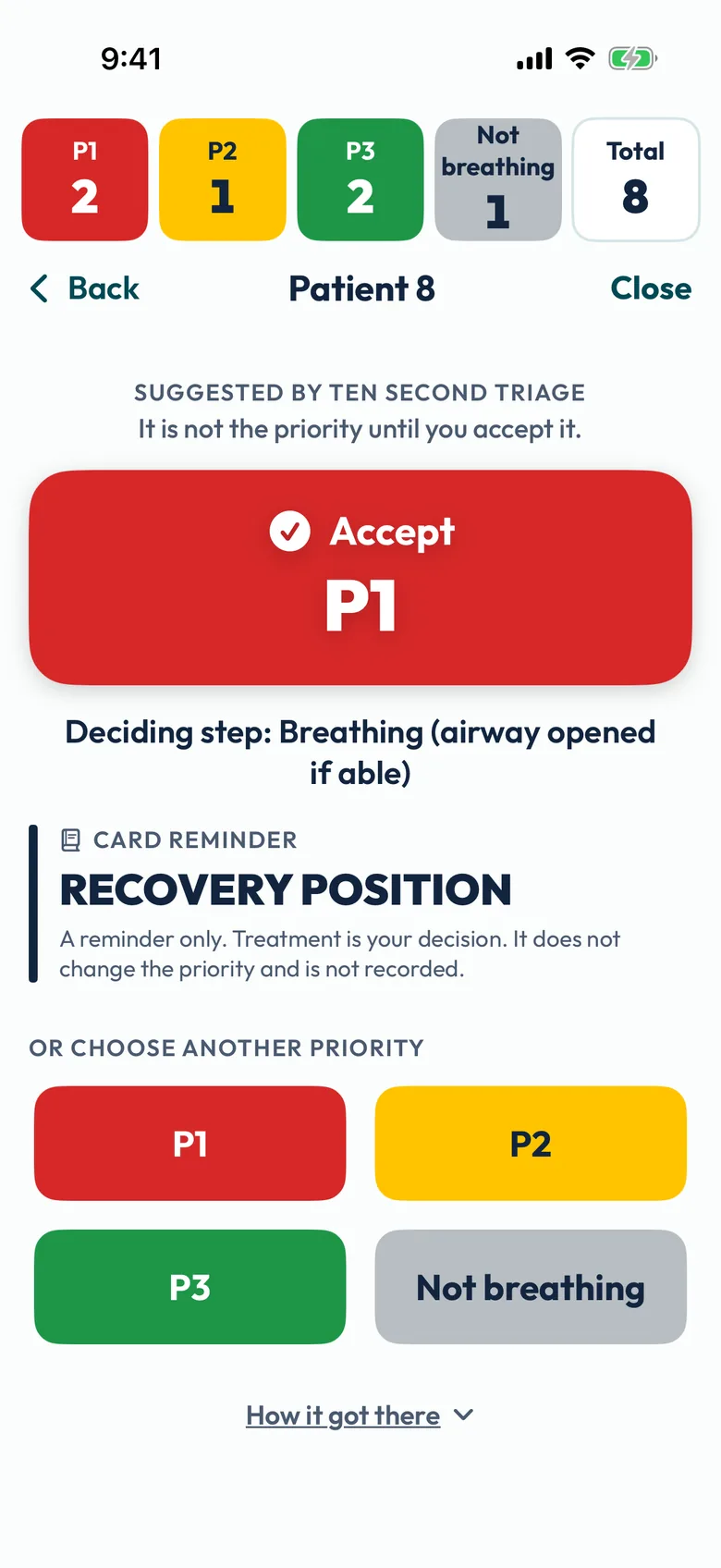
Where the published card prints a treatment beside a step, the app shows it as a reminder from the card. Your service chooses whether they show. They never change the priority and aren't recorded.
Categories
P1, P2, P3 and Not breathing, or your service's own words.
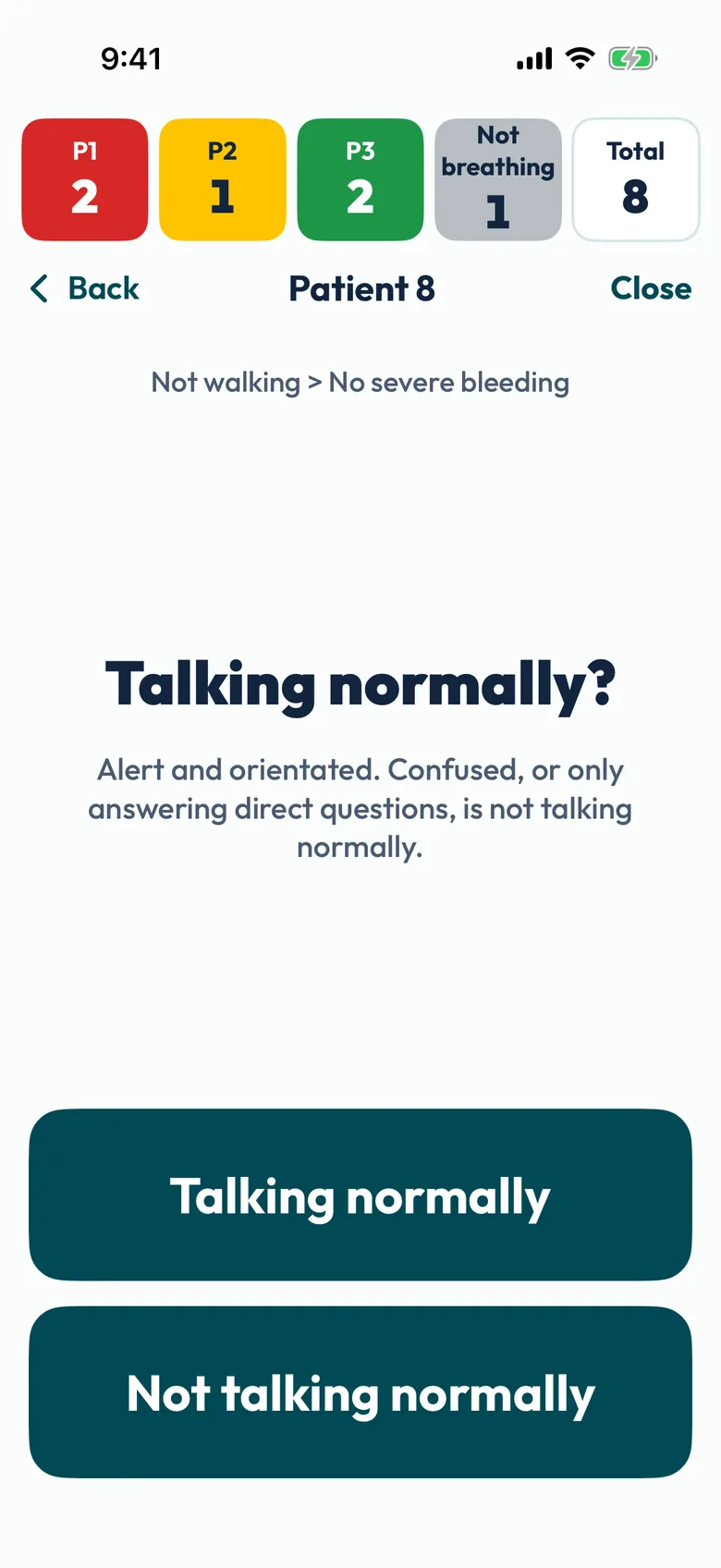
  • Screenshot of the question Talking normally?, with the explanation Alert and orientated, and two large buttons, Talking normally and Not talking normally, under the path Not walking, No severe bleeding
    One question per screen, two large answers.
  • Screenshot of a Ten Second Triage suggestion: a large Accept P1 button, Deciding step Breathing, airway opened if able, a card reminder reading Recovery position marked as a reminder only, the four priorities to choose instead, and How it got there
    Accept, the deciding step and a reminder from the published card.
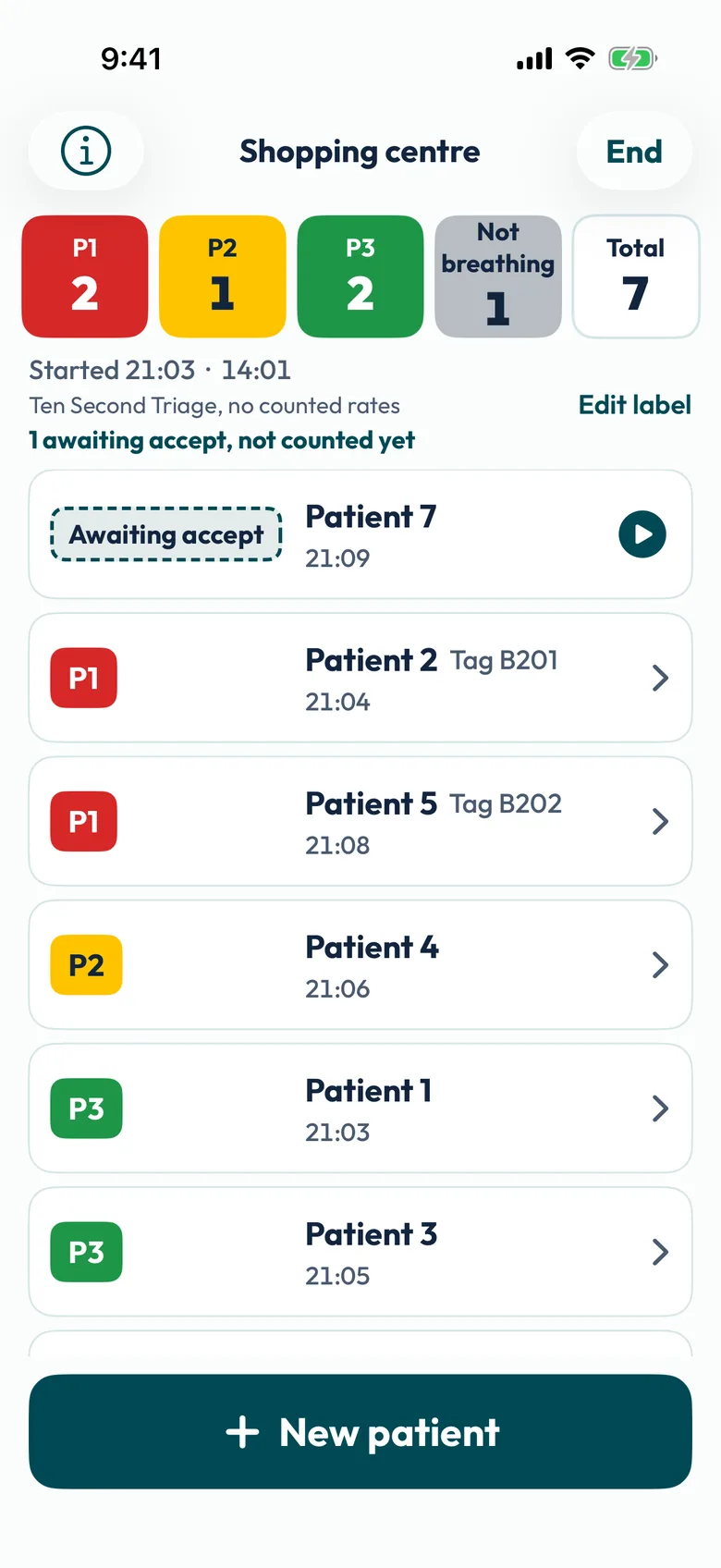
  • Screenshot of a Ten Second Triage incident: a tally of 2 P1, 1 P2, 2 P3, 1 Not breathing, 7 total, and the patient list sorted by priority
    The incident, with a live tally and Not breathing counted on its own.

Screenshots from a test build, made-up patients

Your service's own tool

Using a different published primary triage tool for adults? Tell us which one. Today the app has two tools built: the MIMMS triage sieve and Ten Second Triage.

Another tool would be added as its own preset. Rythmo builds it from the published version, tests it against its own cases and documents it, then you check it against your protocol and your clinical lead signs it off before anyone uses it. We can't promise every tool, but we'd like to hear what you use.

Set up for your organisation

Every organisation gets its own setup, built around its own protocol. Your clinicians can see exactly what it's running, and they can't change it on the phone.

  • Your toolThe MIMMS triage sieve or Ten Second Triage, in its published order.
  • Your thresholdsSet from your protocol, within the published tool. For the sieve, for example, a respiratory rate band of 10 to 29 or 10 to 30, and pulse with capillary refill as the fallback, or capillary refill only.
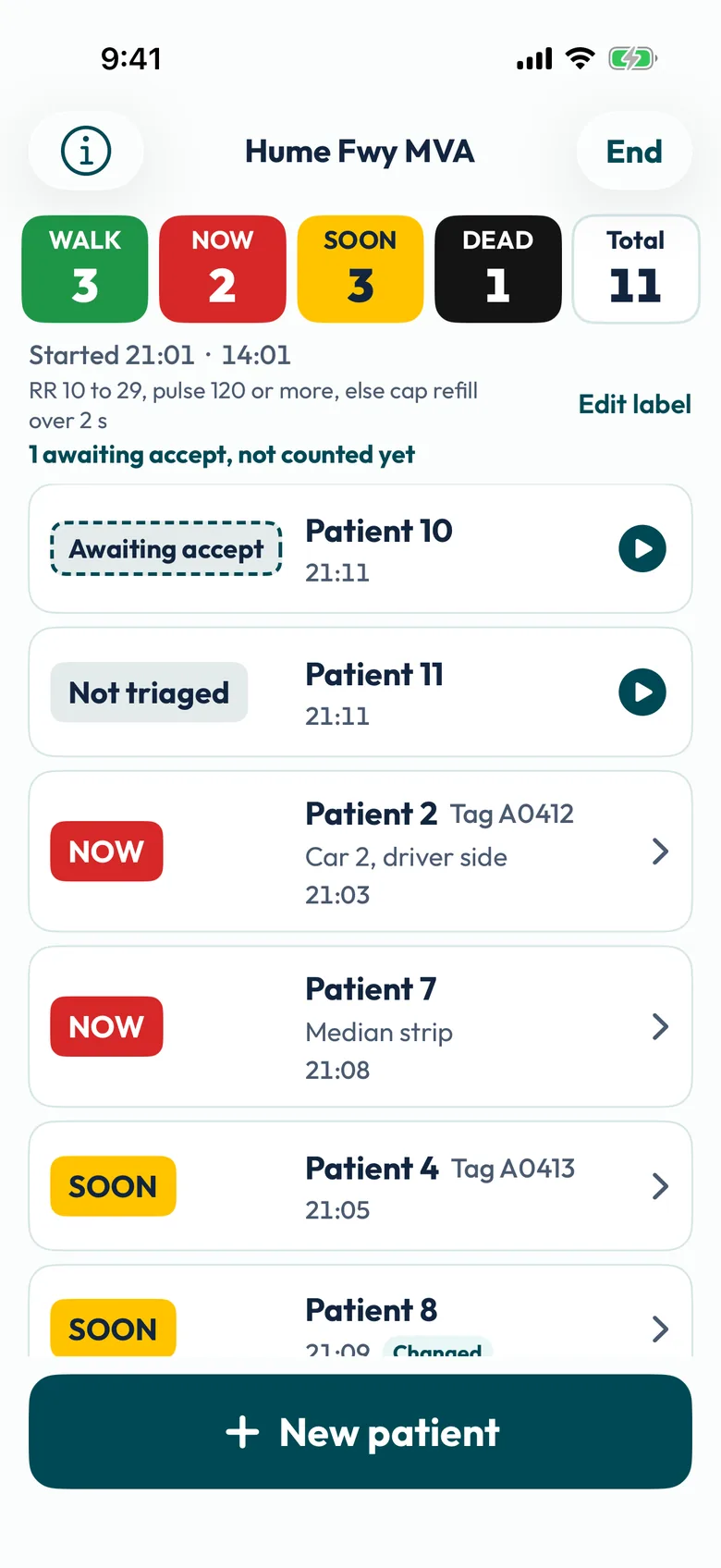
  • Your category labelsYour service's words for each priority, on every screen and in the tally. Colours stay fixed by priority, and the label always shows with the colour.
  • Your name and protocol version on screenYour organisation, protocol version, who approved it and when, and every threshold, one tap away.
  • Signed, so it can't be alteredEach setup is digitally signed. There's nothing on the phone to change it, and a new protocol version only applies when the responder taps Update now, never mid-incident.
  • A licence locked activation codeResponders type in your service's code once. From then on the app works offline.
Screenshot of an incident for a made-up test service whose categories are WALK, NOW, SOON and DEAD, shown in the tally and on every patient
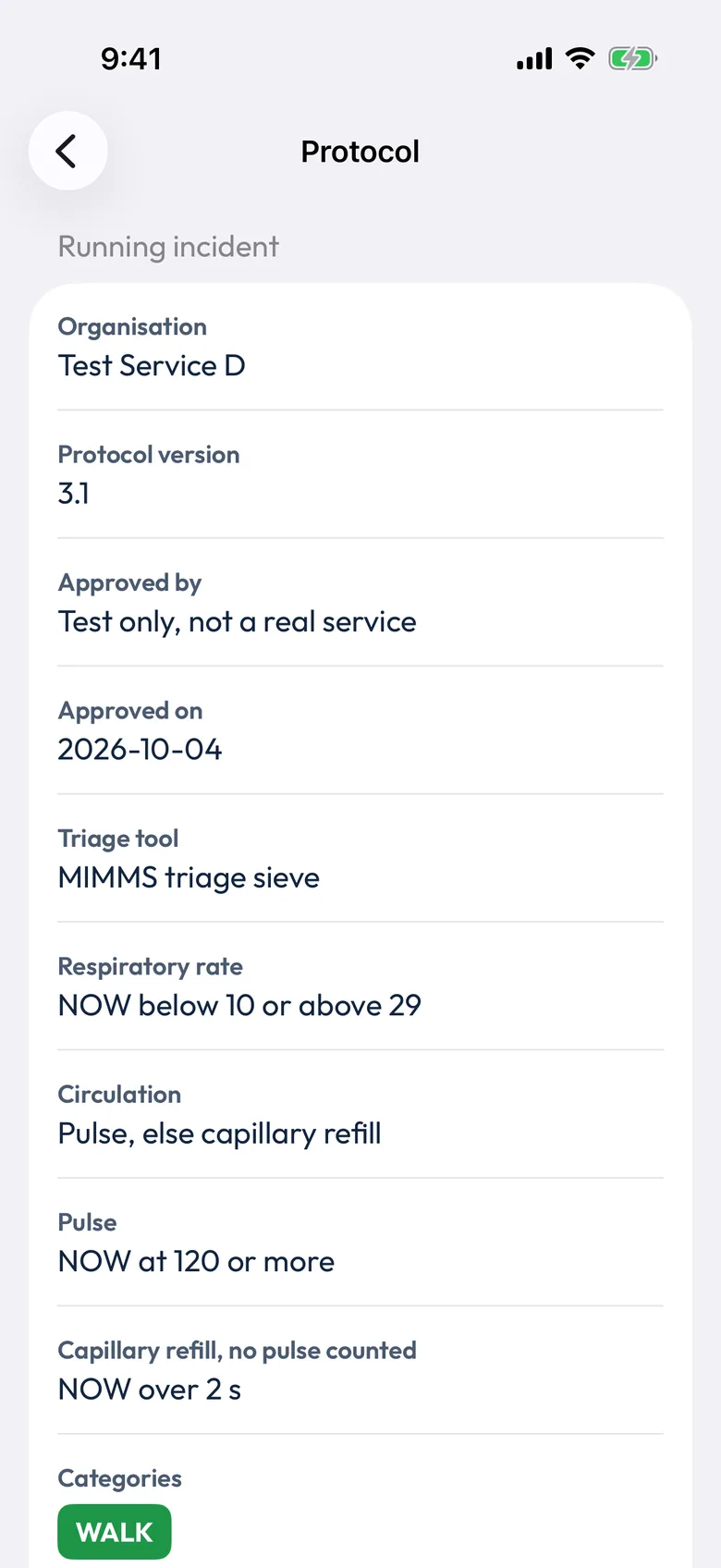
Screenshot of the Protocol screen for a made-up test service: organisation Test Service D, protocol version 3.1, approved by Test only, not a real service, approved on 4 October 2026, triage tool MIMMS triage sieve, and each threshold in the service's own labels
Screenshots from a test build. Test Service D is made up

Need something it doesn't do yet?

Tell us what your service needs. If your incident commanders or clinical leads want something on the day that the app doesn't do, we'd like to hear it. New features are worked out with the services that will use them, tested by Rythmo, and only reach your clinicians once your clinical lead has signed them off.

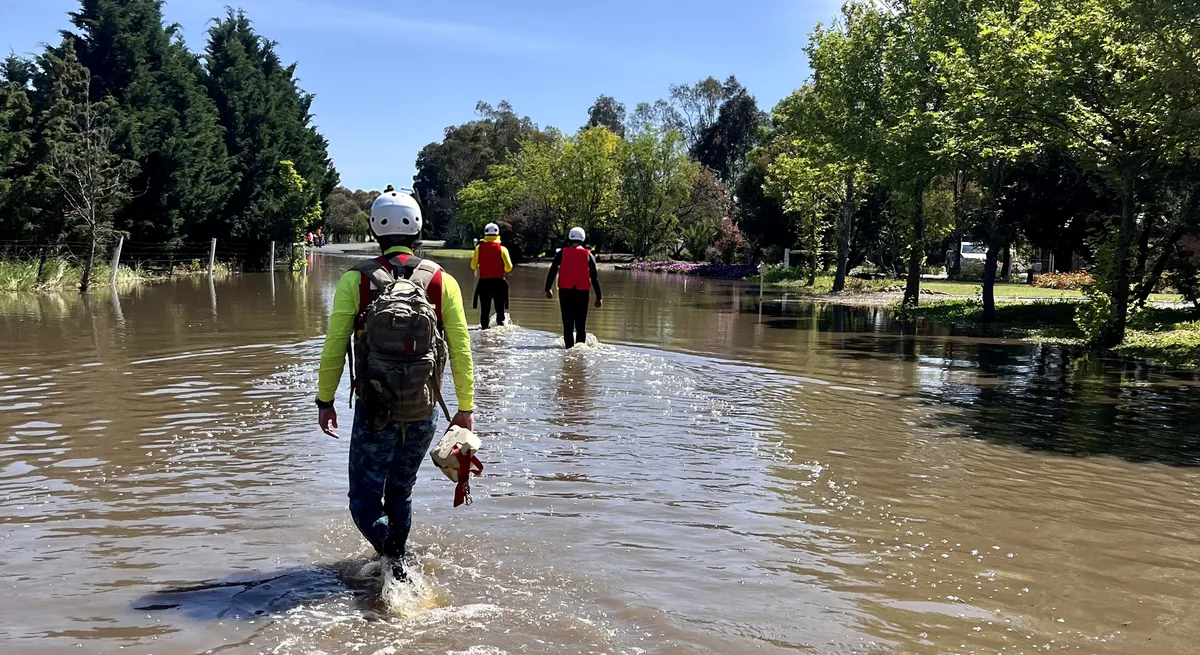
Three rescuers in helmets wading down a flooded street, seen from behind

On the day

Built for one clinician, one phone and a lot going on.

  • One question per screenOne tap per answer. A walking patient takes three taps: New patient, Walking, Accept.
  • The working is always thereEvery suggestion shows the step that decided it. The full path, with the answers, the rates and the thresholds, is one tap away. Nothing is weighted, and no rule is hidden.
  • The clinician decidesAccept the suggestion or change it in one tap. Both are kept and changes are flagged. A value that can't be obtained never picks a priority.
  • Live tallyA count by category, in your labels, across the top of every screen. Tap it to filter the patient list.
  • Re-triageRe-triage any patient at any time. Earlier assessments stay in the record.
  • Export and closeEnd the incident for a summary with totals and a timeline, then export it as a CSV through the channel your service approves.
  • Works with no signalFully offline once activated. Triage never waits on the network.
  • Glove friendlyMain buttons at least 60 points tall, haptics on every tap, the screen stays awake, and Dynamic Type and VoiceOver work throughout.
  • No names asked forTag number and a short location note are optional, with a reminder not to enter identifying details.

What it doesn't do

  • It doesn't decide. It suggests a priority from the answers and rates the clinician enters, and it doesn't see or monitor the patient. Clinical judgement always comes first.
  • Triage tools have known under-triage. The app follows the tool, so it carries the same limits. More on the evidence.
  • It's for adults only. There's no paediatric tool.
  • The triage sieve has no catastrophic haemorrhage step. Manage catastrophic bleeding following your service's protocol.
  • Both respiratory rate and pulse are counted by tapping once per breath or beat. The tap method has been studied for respiratory rate in adults, and for heart rate in newborns during resuscitation, but not for pulse in adults. Check the confidence indicator and your own count before relying on it. The studies.
  • It isn't monitoring. No trend graphs, no alarms.
  • It doesn't replace your tags or cards, or your mass casualty training. The phone isn't the official record.
  • No study of the app has been done, and it hasn't been used at a real incident.

Rythmo Triage is for registered health professionals trained in mass casualty triage, such as paramedics, nurses and doctors, and asks every user to confirm that before it opens. It isn't intended for first aiders, lifesavers, emergency response team members or anyone else who isn't a registered health professional. Students use it only in simulation, under their institution's training licence, with no real patients.

Intended purpose. Rythmo Triage is a phone app (iPhone now, Android planned) that supports primary triage of adult casualties at a mass casualty incident. It mirrors the published primary triage tool that the contracted organisation already uses, such as the MIMMS triage sieve or Ten Second Triage. It steps a registered health professional through that tool's questions in its published order and shows the tool's thresholds. Where the tool uses respiratory rate or pulse, the app can calculate them from the clinician's taps on the screen. It suggests a triage priority with the full path that produced it. The clinician accepts or changes the suggestion; only the clinician's choice makes a priority final. The app keeps a log of each assessment and a count of patients by priority for the incident.

Simulation setup. In its simulation configuration, Rythmo Triage is a training and research tool for the licensed institution. It is used in simulated mass casualty exercises with mannequins, simulated patients and actors. It is not for use with real patients or for any decision about a real person's care.

THIS PRODUCT IS NOT AVAILABLE FOR PURCHASE BY THE GENERAL PUBLIC. ALWAYS FOLLOW THE DIRECTIONS FOR USE.

How to start

Three steps, for a service or a university.

  1. A demo callWe walk through the app with you and your clinical lead or simulation coordinator, using your own tool and a few made-up patients.
  2. Setup and sign-offWe set the app up with your tool, thresholds, labels and protocol version, or as a simulation setup. You get a test version to check against your protocol, and your clinical lead signs it off in writing before go-live.
  3. Activation codesYour people download the app and enter your organisation's code once. You decide who gets it. Every later change is checked and signed off the same way.

Questions

Does it work without signal?

Yes. Once a phone is activated, triage works fully offline and never waits on the network. The app checks its licence about once a day when no incident is open and there's signal.

What data leaves the phone?

No patient or incident data. There's no account and no analytics. The licence check carries the activation code or your licence and protocol version, a random install ID the app makes, and the app version. Patient and incident details stay on the phone unless the clinician exports them, through the channel your service approves.

Which triage tools does it support?

The MIMMS triage sieve and Ten Second Triage, both for adults. If your service uses a different published tool, tell us which one (see your service's own tool).

Can we change thresholds or labels ourselves?

Not on the phone. Rythmo sets up each change from your protocol, you check it on a test version, and your clinical lead signs it off. The new signed setup then reaches your phones, and each responder applies it with an Update now tap.

Does it run on iPhone and Android?

iPhone comes first, on iOS 17 or later. Android is planned. It's built to the same triage logic and has to pass the same shared file of test cases as the iPhone app, so both suggest the same priority from the same answers. If your service needs Android, tell us, because it helps us decide what comes next.

Can students use it?

Only in simulation, under their university's or training provider's licence, with mannequins, simulated patients and actors. Not on placements, shifts or real incidents. Real patient use is for registered health professionals only.

Does it replace our triage tags?

No. It's used alongside your service's own tags or cards. A phone can go flat or be dropped, and the phone isn't the official record.

See it with your own tool

If you lead clinicians who triage at major incidents or events, or run mass casualty simulation for students, we'll run a live demo with you. Bring your tool and we'll walk a few made-up patients through it together.

Or email hello@rythmo.com.au.

Sources

MIMMS triage sieve: National Critical Care and Trauma Response Centre. Mass casualty management plan, appendix 1: MIMMS sieve and sort aide memoire. In: AUSMAT clinical compendium 2023. Darwin: NCCTRC; 2023. p. 80. Method from Advanced Life Support Group; Gleeson T, Mackway-Jones K, editors. Major incident medical management and support: the practical approach at the scene. 4th ed. Chichester: Wiley-Blackwell; 2023.

Ten Second Triage: NHS England. Ten Second Triage tool (TST). Publication reference PRN00365iv. London: NHS England; April 2023. NHS England. Major incident triage tools, letter to acute trusts. Publication reference PRN00358_ii. London: NHS England; April 2023. Supplementary guidance: National Ambulance Resilience Unit (now the NHS Resilience Emergency Capabilities Unit). Ten Second Triage (TST): non clinical responders, supplementary information. Version 1.0. April 2023. Contains public sector information licensed under the Open Government Licence v3.0.

Tap method: Karlen W, Gan H, Chiu M, et al. Improving the accuracy and efficiency of respiratory rate measurements in children using mobile devices. PLoS One. 2014;9(6):e99266. doi.org/10.1371/journal.pone.0099266

Rythmo isn't affiliated with or endorsed by NHS England, the NHS, the NHS Resilience Emergency Capabilities Unit (formerly NARU), the National Critical Care and Trauma Response Centre (NCCTRC) or Advanced Life Support Group.